
Channeling Staff Tutorial
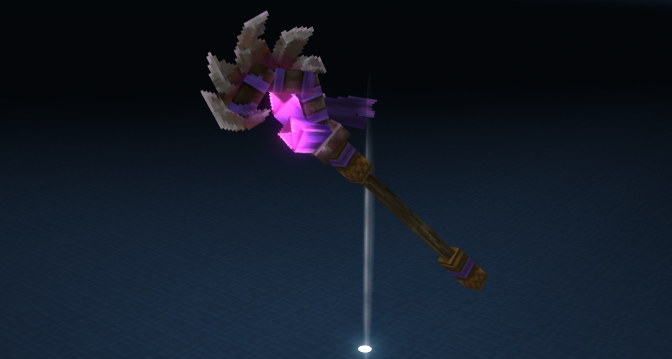
In this tutorial, you’ll create a magical channeling staff that demonstrates complex interaction patterns including multi-tier charging, forking, damage cancellation, and visual feedback.
What We’re Building
Section titled “What We’re Building”Final Result:
- A magical staff with 3 charge tiers (0.5s, 1.5s, 3.0s)
- Secondary “quick cast” fork while channeling
- Visual/audio feedback at each tier
- Damage cancellation if hit while channeling
- Progress bar during charge
Prerequisites
Section titled “Prerequisites”Before starting, you should understand:
- Asset-Based Interactions - JSON interaction basics
- Charging Mechanics - Charging system
- Basic plugin structure with asset folders
File Structure
Section titled “File Structure”Directorymy-plugin/
- manifest.json
Directoryassets/
DirectoryServer/
DirectoryItem/
DirectoryItems/
DirectoryWeapon/
DirectoryStaff/
- Weapon_Staff_Channeling.json
DirectoryInteractions/
DirectoryStaff/
- Staff_Channeling_Primary.json
- Staff_Channeling_Tier1.json
- Staff_Channeling_Tier2.json
- Staff_Channeling_Tier3.json
- Staff_Channeling_QuickCast.json
- Staff_Channeling_Failed.json
DirectoryRootInteractions/
DirectoryStaff/
- Root_Staff_Channeling_Primary.json
- Root_Staff_Channeling_QuickCast.json
Part 1: Create the RootInteraction
Section titled “Part 1: Create the RootInteraction”The RootInteraction is the entry point that items reference.
-
Create the folder structure for your staff interactions
-
Create the root interaction file
{ "RequireNewClick": true, "ClickQueuingTimeout": 0.3, "Cooldown": { "Cooldown": 0.5, "Id": "Staff_Channeling" }, "Interactions": [ "Staff_Channeling_Primary" ]}| Field | Description |
|---|---|
RequireNewClick | Must click again, not hold |
ClickQueuingTimeout | Window to queue next click |
Id | Cooldown identifier shared across staff abilities |
Part 2: Build the Charging Interaction
Section titled “Part 2: Build the Charging Interaction”This is the core of our staff - the charging mechanic with three tiers.
{ "Type": "Charging", "DisplayProgress": true, "FailOnDamage": true, "MouseSensitivityAdjustmentTarget": 0.5, "MouseSensitivityAdjustmentDuration": 0.3, "Effects": { "ItemAnimationId": "Channel", "WorldSoundEventId": "SFX_Staff_Charge_Loop" }, "Delay": { "MinDelay": 0.1, "MaxDelay": 0.4, "MinHealth": 0.2, "MaxHealth": 0.8 }, "Next": { "0.5": "Staff_Channeling_Tier1", "1.5": "Staff_Channeling_Tier2", "3.0": "Staff_Channeling_Tier3" }, "Forks": { "Secondary": "Root_Staff_Channeling_QuickCast" }, "Failed": "Staff_Channeling_Failed"}Understanding the Configuration
Section titled “Understanding the Configuration”The Next field maps charge duration to interactions:
| Duration | Tier | Effect |
|---|---|---|
| 0.5s | Tier 1 | Quick spark projectile |
| 1.5s | Tier 2 | AOE burst damage |
| 3.0s | Tier 3 | Powerful beam with knockback |
When released, the system picks the highest tier reached.
FailOnDamage: true cancels the charge if hit.
The Delay config adjusts cancellation timing based on health:
- Below 20% health (
MinHealth): no delay is applied at all - Above 80% health (
MaxHealth): delay is capped atMaxDelay(0.4s) - Between 20%-80%: delay scales upward from
MinDelay(0.1s) at 20% HP toMaxDelay(0.4s) at 80% HP — higher health means more delay protection
Low-health players lose delay protection entirely, making them more vulnerable to charge interruption.
Forks.Secondary allows right-click while charging to trigger a quick-cast spell without losing the charge state.
Part 3: Implement Tier Effects
Section titled “Part 3: Implement Tier Effects”Each tier has its own interaction chain for unique effects.
Quick projectile attack for instant release:
{ "Type": "Serial", "Interactions": [ { "Type": "Simple", "RunTime": 0.15, "Effects": { "ItemAnimationId": "Cast_Quick", "WorldSoundEventId": "SFX_Staff_Cast_Light", "WorldParticles": [ { "SystemId": "Magic_Spark_Cast" } ] } }, { "Type": "LaunchProjectile", "ProjectileId": "Projectile_Magic_Spark" } ]}AOE damage around the caster:
{ "Type": "Serial", "Interactions": [ { "Type": "Simple", "RunTime": 0.2, "Effects": { "ItemAnimationId": "Cast_Medium", "WorldSoundEventId": "SFX_Staff_Cast_Medium", "WorldParticles": [ { "SystemId": "Magic_Burst_Buildup" } ], "CameraEffect": "Magic_Pulse" } }, { "Type": "Selector", "RunTime": 0.1, "Effects": { "WorldParticles": [ { "SystemId": "Magic_Burst_Explode" } ], "CameraEffect": "Magic_Burst_Impact" }, "Selector": { "Id": "Horizontal", "Direction": "ToRight", "StartDistance": 0.0, "EndDistance": 5.0, "Length": 360 }, "HitEntity": { "Interactions": [ { "Type": "DamageEntity", "DamageCalculator": { "Class": "Signature", "BaseDamage": { "Magic": 25 } }, "DamageEffects": { "Knockback": { "Type": "Directional", "RelativeX": 0, "VelocityY": 2, "RelativeZ": 0, "Force": 5.0 }, "WorldParticles": [ { "SystemId": "Magic_Hit" } ] } } ] } } ]}Powerful forward beam with knockback:
{ "Type": "Serial", "Interactions": [ { "Type": "Simple", "RunTime": 0.3, "Effects": { "ItemAnimationId": "Cast_Powerful", "WorldSoundEventId": "SFX_Staff_Cast_Heavy", "WorldParticles": [ { "SystemId": "Magic_Beam_Charge" } ], "CameraEffect": "Magic_Power_Buildup" } }, { "Type": "Selector", "RunTime": 0.2, "Effects": { "WorldParticles": [ { "SystemId": "Magic_Beam_Fire" } ], "CameraEffect": "Magic_Beam_Fire" }, "Selector": { "Id": "Stab", "StartDistance": 0.5, "EndDistance": 12.0, "ExtendTop": 1.0, "ExtendBottom": 0.5 }, "HitEntity": { "Interactions": [ { "Type": "DamageEntity", "DamageCalculator": { "Class": "Signature", "BaseDamage": { "Magic": 50 } }, "DamageEffects": { "Knockback": { "Type": "Directional", "RelativeX": 0, "VelocityY": 3, "RelativeZ": -10, "Force": 15.0, "VelocityType": "Set" }, "WorldParticles": [ { "SystemId": "Magic_Beam_Impact" } ], "CameraEffect": "Magic_Beam_Hit" } } ] } }, { "Type": "Simple", "RunTime": 0.5, "Effects": { "ItemAnimationId": "Cast_Recovery" } } ]}Part 4: Add the Quick Cast Fork
Section titled “Part 4: Add the Quick Cast Fork”Create a secondary spell that can be cast while channeling:
-
Create the RootInteraction for the quick cast
-
Create the quick cast interaction
{ "RequireNewClick": true, "Cooldown": { "Cooldown": 1.0, "Id": "Staff_QuickCast" }, "Interactions": [ "Staff_Channeling_QuickCast" ]}{ "Type": "Serial", "Interactions": [ { "Type": "Simple", "RunTime": 0.1, "Effects": { "ItemAnimationId": "QuickCast", "WorldSoundEventId": "SFX_Staff_QuickCast", "WorldParticles": [ { "SystemId": "Magic_Shield_Flash" } ] } }, { "Type": "ApplyEffect", "EffectId": "Magic_Shield", "Entity": "User" } ]}Part 5: Create the Failed Interaction
Section titled “Part 5: Create the Failed Interaction”When charge is interrupted by damage:
{ "Type": "Serial", "Interactions": [ { "Type": "Simple", "RunTime": 0.3, "Effects": { "ItemAnimationId": "Channel_Fail", "WorldSoundEventId": "SFX_Staff_Fizzle", "WorldParticles": [ { "SystemId": "Magic_Fizzle" } ], "CameraEffect": "Stagger_Light" } }, { "Type": "ApplyEffect", "EffectId": "Stagger_Brief", "Entity": "User" } ]}Part 6: Create the Item Definition
Section titled “Part 6: Create the Item Definition”Now tie it all together with the item:
{ "Parent": "Template_Weapon_Staff", "TranslationProperties": { "Name": "myplugin.items.staff_channeling.name", "Lore": "myplugin.items.staff_channeling.lore" }, "Model": "MyPlugin/Weapons/Staff_Channeling.blockymodel", "Texture": "MyPlugin/Weapons/Staff_Channeling_Texture.png", "Icon": "MyPlugin/Icons/Staff_Channeling.png", "Quality": "Rare", "ItemLevel": 25, "MaxDurability": 150, "DurabilityLossOnHit": 0.1, "Interactions": { "Primary": "Root_Staff_Channeling_Primary" }, "ItemSoundSetId": "ISS_Weapons_Staff"}Part 7: Testing & Verification
Section titled “Part 7: Testing & Verification”-
Build your plugin and install it on a test server
-
Give yourself the staff with
/give Weapon_Staff_Channeling -
Test each tier by holding and releasing at different times
-
Test the quick cast by right-clicking while charging
-
Test damage cancellation by having another player hit you while charging
Test Checklist
Section titled “Test Checklist”- Tier 1 (0.5s release) fires spark projectile
- Tier 2 (1.5s release) creates AOE burst
- Tier 3 (3.0s release) fires powerful beam
- Quick cast (right-click during charge) applies shield
- Getting hit cancels charge and plays fizzle effect
- Progress bar shows during charge
- All sounds and particles trigger correctly
Complete File Reference
Section titled “Complete File Reference”{ "RequireNewClick": true, "ClickQueuingTimeout": 0.3, "Cooldown": { "Cooldown": 0.5, "Id": "Staff_Channeling" }, "Interactions": ["Staff_Channeling_Primary"]}{ "RequireNewClick": true, "Cooldown": { "Cooldown": 1.0, "Id": "Staff_QuickCast" }, "Interactions": ["Staff_Channeling_QuickCast"]}{ "Type": "Charging", "DisplayProgress": true, "FailOnDamage": true, "MouseSensitivityAdjustmentTarget": 0.5, "MouseSensitivityAdjustmentDuration": 0.3, "Effects": { "ItemAnimationId": "Channel", "WorldSoundEventId": "SFX_Staff_Charge_Loop" }, "Delay": { "MinDelay": 0.1, "MaxDelay": 0.4, "MinHealth": 0.2, "MaxHealth": 0.8 }, "Next": { "0.5": "Staff_Channeling_Tier1", "1.5": "Staff_Channeling_Tier2", "3.0": "Staff_Channeling_Tier3" }, "Forks": { "Secondary": "Root_Staff_Channeling_QuickCast" }, "Failed": "Staff_Channeling_Failed"}{ "Parent": "Template_Weapon_Staff", "TranslationProperties": { "Name": "myplugin.items.staff_channeling.name", "Lore": "myplugin.items.staff_channeling.lore" }, "Model": "MyPlugin/Weapons/Staff_Channeling.blockymodel", "Texture": "MyPlugin/Weapons/Staff_Channeling_Texture.png", "Icon": "MyPlugin/Icons/Staff_Channeling.png", "Quality": "Rare", "ItemLevel": 25, "MaxDurability": 150, "DurabilityLossOnHit": 0.1, "Interactions": { "Primary": "Root_Staff_Channeling_Primary" }, "ItemSoundSetId": "ISS_Weapons_Staff"}Next Steps & Challenges
Section titled “Next Steps & Challenges”Related
Section titled “Related”- Charging Mechanics - Detailed charging reference
- Asset-Based Interactions - JSON interaction guide
- Control Flow Patterns - Serial, Parallel, etc.
- Custom Weapon Tutorial - Simpler weapon example