
Create a Custom Weapon
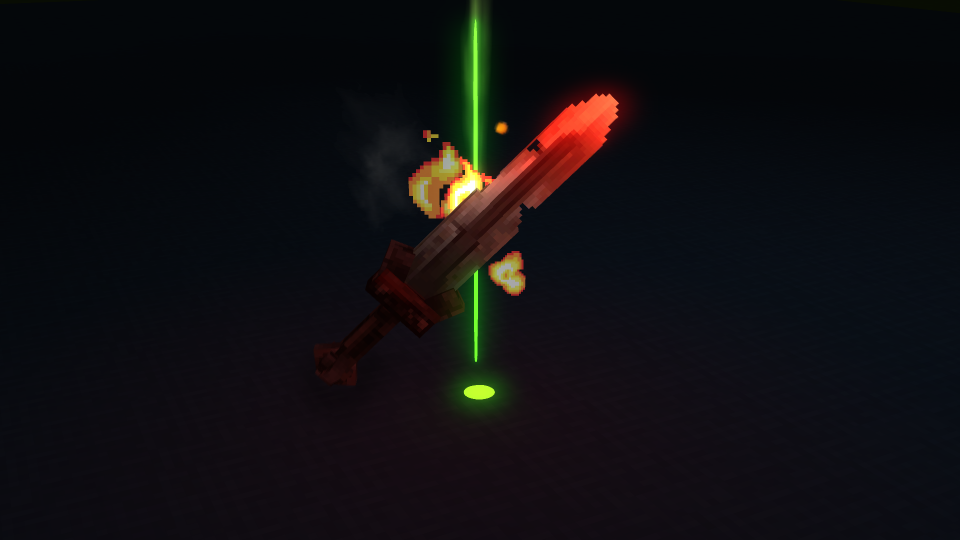
This tutorial walks you through creating a complete custom weapon for Hytale, from designing the model in Blockbench to defining the item in JSON and integrating it into your plugin.
What You’ll Create
Section titled “What You’ll Create”By the end of this tutorial, you’ll have:
- A custom sword model created in Blockbench
- A texture for the weapon
- A complete item definition with damage values
- A crafting recipe
- The weapon integrated into a plugin
Prerequisites
Section titled “Prerequisites”Before starting, ensure you have:
- Blockbench installed with the Hytale plugin
- A basic understanding of JSON
- A Hytale server plugin project set up
- Familiarity with the Item System
Part 1: Plan Your Weapon
Section titled “Part 1: Plan Your Weapon”-
Choose a weapon type
We’ll create a custom sword called “Flame Sword” that inherits from the standard sword template. This gives us access to all sword attack patterns automatically.
-
Define the stats
Plan your weapon’s characteristics:
- Quality: Rare (blue tier)
- Item Level: 35
- Base Swing Damage: ~12 Physical (stronger than iron)
- Durability: 150
- Special: Fire particle effects
-
Sketch the design
Before modeling, sketch your sword design. Consider:
- Blade shape and length
- Handle design
- Guard style
- Any special visual elements (flames, glowing parts)
Part 2: Create the Model
Section titled “Part 2: Create the Model”-
Open Blockbench and create a new Hytale Model
- Go to File > New > Hytale Model
- Name:
Flame_Sword - Use scale: 32px = 1 block (standard for items)
-
Create the blade
- Add a new cube for the blade
- Set dimensions to approximately:
- Width: 2px
- Height: 24px
- Depth: 4px
- Position it extending upward from the origin
-
Create the guard
- Add another cube for the crossguard
- Dimensions: 8px x 2px x 4px
- Position below the blade
-
Create the handle
- Add a cube for the grip
- Dimensions: 2px x 8px x 2px
- Position below the guard
-
Set up bones for animation
- Create a bone named
Handleat the grip position - Parent all geometry to this bone
- This allows the sword to animate correctly when held
- Create a bone named
-
Verify constraints
- Check node count (should be well under 255)
- Ensure all geometry is cubes
- Verify bone hierarchy is correct
Part 3: Create the Texture
Section titled “Part 3: Create the Texture”-
Create a texture template
- In Blockbench, go to the Paint tab
- Create a new texture: 64x64 pixels (multiple of 32)
-
Paint the blade
- Use a gradient from orange to red for a flame effect
- Add bright yellow highlights along the edge
- Consider adding subtle glow patterns
-
Paint the handle and guard
- Use dark metals (gray/black) for contrast
- Add gold or brass accents on the guard
- Wrap texture on the handle for grip detail
-
Export the texture
- Save as
Flame_Sword_Texture.png - Ensure dimensions are exact (64x64)
- Save as
Part 4: Export the Model
Section titled “Part 4: Export the Model”-
Export the model
- Go to File > Export > Export Hytale Model
- Save as
Flame_Sword.blockymodel
-
Organize files
Create this folder structure in your plugin:
Directorymy-plugin/
Directoryassets/
Directoryitem/
- MyPlugin_Sword_Flame.json
Directorymodel/
DirectoryMyPlugin/
DirectoryWeapons/
DirectorySword/
- Flame_Sword.blockymodel
- Flame_Sword_Texture.png
- manifest.json
-
Copy files to locations
- Place
.blockymodelin the model folder - Place
.pngtexture alongside it
- Place
Part 5: Create the Item Definition
Section titled “Part 5: Create the Item Definition”Create the JSON file that defines your weapon’s behavior:
{ "Parent": "Template_Weapon_Sword", "TranslationProperties": { "Name": "server.items.MyPlugin_Sword_Flame.name" }, "Model": "MyPlugin/Weapons/Sword/Flame_Sword.blockymodel", "Texture": "MyPlugin/Weapons/Sword/Flame_Sword_Texture.png", "Icon": "Icons/ItemsGenerated/MyPlugin_Sword_Flame.png", "Quality": "Rare", "ItemLevel": 35, "Categories": ["Items.Weapons"], "Tags": { "Type": ["Weapon"], "Family": ["Sword"] }, "Recipe": { "TimeSeconds": 5.0, "KnowledgeRequired": false, "Input": [ { "ItemId": "Ingredient_Bar_Iron", "Quantity": 8 }, { "ItemId": "Ingredient_Leather_Light", "Quantity": 4 }, { "ItemId": "Ingredient_Ember", "Quantity": 6 } ], "BenchRequirement": [ { "Type": "Crafting", "Categories": ["Weapon_Sword"], "Id": "Weapon_Bench" } ] }, "InteractionVars": { "Swing_Left_Damage": { "Interactions": [{ "Parent": "Weapon_Sword_Primary_Swing_Left_Damage", "DamageCalculator": { "BaseDamage": { "Physical": 12 } }, "DamageEffects": { "WorldSoundEventId": "SFX_Sword_T2_Impact", "LocalSoundEventId": "SFX_Sword_T2_Impact", "WorldParticles": [{ "SystemId": "Fire_Impact_Small" }] } }] }, "Swing_Right_Damage": { "Interactions": [{ "Parent": "Weapon_Sword_Primary_Swing_Right_Damage", "DamageCalculator": { "BaseDamage": { "Physical": 13 } }, "DamageEffects": { "WorldSoundEventId": "SFX_Sword_T2_Impact", "LocalSoundEventId": "SFX_Sword_T2_Impact", "WorldParticles": [{ "SystemId": "Fire_Impact_Small" }] } }] }, "Swing_Down_Damage": { "Interactions": [{ "Parent": "Weapon_Sword_Primary_Swing_Down_Damage", "DamageCalculator": { "BaseDamage": { "Physical": 22 } }, "DamageEffects": { "WorldSoundEventId": "SFX_Sword_T2_Impact", "LocalSoundEventId": "SFX_Sword_T2_Impact", "WorldParticles": [{ "SystemId": "Fire_Impact_Medium" }] } }] }, "Thrust_Damage": { "Interactions": [{ "Parent": "Weapon_Sword_Primary_Thrust_Damage", "DamageCalculator": { "BaseDamage": { "Physical": 32 } }, "EntityStatsOnHit": [ { "EntityStatId": "SignatureEnergy", "Amount": 4 } ], "DamageEffects": { "WorldSoundEventId": "SFX_Sword_T2_Impact", "LocalSoundEventId": "SFX_Sword_T2_Impact", "WorldParticles": [{ "SystemId": "Fire_Impact_Large" }] } }] }, "Vortexstrike_Spin_Damage": { "Interactions": [{ "Parent": "Weapon_Sword_Signature_Vortexstrike_Spin_Damage", "DamageCalculator": { "BaseDamage": { "Physical": 24 } }, "DamageEffects": { "WorldSoundEventId": "SFX_Sword_T2_Impact", "LocalSoundEventId": "SFX_Sword_T2_Impact", "WorldParticles": [{ "SystemId": "Fire_Burst" }] } }] }, "Vortexstrike_Stab_Damage": { "Interactions": [{ "Parent": "Weapon_Sword_Signature_Vortexstrike_Stab_Damage", "DamageCalculator": { "BaseDamage": { "Physical": 70 } }, "DamageEffects": { "WorldSoundEventId": "SFX_Sword_T2_Impact", "LocalSoundEventId": "SFX_Sword_T2_Impact", "WorldParticles": [{ "SystemId": "Fire_Explosion" }] } }] }, "Guard_Wield": { "Interactions": [{ "Parent": "Weapon_Sword_Secondary_Guard_Wield", "StaminaCost": { "Value": 8, "CostType": "Damage" } }] } }, "MaxDurability": 150, "DurabilityLossOnHit": 0.18, "Particles": [ { "SystemId": "Sword_Fire_Idle", "TargetNodeName": "Handle", "PositionOffset": { "X": 0.6 }, "TargetEntityPart": "PrimaryItem" } ], "ItemSoundSetId": "ISS_Weapons_Blade_Large"}Understanding the Definition
Section titled “Understanding the Definition”Let’s break down the key sections:
{ "Parent": "Template_Weapon_Sword"}By inheriting from Template_Weapon_Sword, we get:
- All basic sword attack patterns
- The Vortexstrike signature ability
- Guard/block mechanics
- Proper animation bindings
We only need to override the values we want to change.
{ "InteractionVars": { "Swing_Left_Damage": { "Interactions": [{ "Parent": "Weapon_Sword_Primary_Swing_Left_Damage", "DamageCalculator": { "BaseDamage": { "Physical": 12 } } }] } }}Each attack type has its own damage definition. The Parent field inherits the base attack behavior while we override the damage value. The DamageCalculator also supports a Class field (DamageClass) for equipment modifier calculations; if omitted, it defaults to UNKNOWN.
Damage Comparison (Iron Sword vs Flame Sword):
| Attack | Iron Sword | Flame Sword |
|---|---|---|
| Swing Left | 9 | 12 |
| Swing Right | 10 | 13 |
| Swing Down | 18 | 22 |
| Thrust | 26 | 32 |
| Vortexstrike Spin | 19 | 24 |
| Vortexstrike Stab | 56 | 70 |
{ "DamageEffects": { "WorldParticles": [{ "SystemId": "Fire_Impact_Small" }] }, "Particles": [ { "SystemId": "Sword_Fire_Idle", "TargetNodeName": "Handle", "PositionOffset": { "X": 0.6 }, "TargetEntityPart": "PrimaryItem" } ]}DamageEffects.WorldParticles: Particles when hitting enemies
Particles: Constant particles on the weapon (the flame effect)
{ "Recipe": { "TimeSeconds": 5.0, "KnowledgeRequired": false, "Input": [ { "ItemId": "Ingredient_Bar_Iron", "Quantity": 8 }, { "ItemId": "Ingredient_Leather_Light", "Quantity": 4 }, { "ItemId": "Ingredient_Ember", "Quantity": 6 } ], "BenchRequirement": [ { "Type": "Crafting", "Categories": ["Weapon_Sword"], "Id": "Weapon_Bench" } ] }}Requires a Weapon Bench with sword crafting capability. Uses iron bars, leather, and a fire-related ingredient (Ember). Takes 5 seconds to craft.
You can also add "RequiredTierLevel" (integer) to BenchRequirement to restrict the recipe to benches of a certain upgrade tier, and "RequiredMemoriesLevel" (integer, defaults to 1) to the recipe to gate it behind the memories system.
Part 6: Configure Plugin Manifest
Section titled “Part 6: Configure Plugin Manifest”Update your manifest.json to include the asset pack:
{ "Group": "com.example", "Name": "MyPlugin", "Version": "1.0.0", "Description": "Adds the Flame Sword weapon", "Authors": [{ "Name": "YourName" }], "IncludesAssetPack": true}The "IncludesAssetPack": true setting tells the server to load assets from the assets/ directory.
Part 7: Add Localization
Section titled “Part 7: Add Localization”Create a language file for the weapon name:
# flame sworditems.MyPlugin_Sword_Flame.name = Flame Sworditems.MyPlugin_Sword_Flame.description = A sword imbued with eternal fire. Burns enemies on impact.Part 8: Test Your Weapon
Section titled “Part 8: Test Your Weapon”-
Build your plugin
Package your plugin JAR with the assets folder included.
-
Install on server
Place the JAR in your server’s plugins directory.
-
Start the server
Watch for any asset loading errors in the console.
-
Test in-game
- Give yourself the weapon:
/give @s MyPlugin_Sword_Flame - Test all attack types:
- Left swing
- Right swing
- Down swing
- Thrust
- Vortexstrike (charge by hitting enemies)
- Test blocking
- Verify particles appear
- Check durability decreases correctly
- Give yourself the weapon:
-
Test crafting
- Find or spawn a Weapon Bench
- Gather required materials
- Craft the sword
- Verify recipe works correctly
Troubleshooting
Section titled “Troubleshooting”Weapon doesn’t appear
Section titled “Weapon doesn’t appear”Model looks wrong
Section titled “Model looks wrong”Attacks don’t work
Section titled “Attacks don’t work”No particles
Section titled “No particles”Damage Balancing Guide
Section titled “Damage Balancing Guide”The values below are suggested guidelines for modders, not official game balance data. Use them as a starting point and adjust for your own content.
When creating weapons, follow these guidelines for balanced progression:
| Material Tier | Quality | Item Level | Swing Damage | Durability |
|---|---|---|---|---|
| Wood/Bone | Common | 5-10 | 5-7 | 40-60 |
| Copper | Common | 10-15 | 7-9 | 60-80 |
| Iron | Uncommon | 15-25 | 9-12 | 80-120 |
| Steel | Uncommon | 25-35 | 12-15 | 100-150 |
| Mithril | Rare | 35-50 | 15-20 | 150-200 |
| Adamantite | Epic | 50-70 | 20-28 | 200-300 |
| Legendary | Legendary | 70+ | 28+ | 300+ |
Attack Type Damage Multipliers:
- Swing Left/Right: 1.0x base
- Swing Down: 1.8-2.0x base
- Thrust: 2.5-3.0x base
- Signature Spin: 1.8-2.0x base
- Signature Stab: 5.5-6.0x base
Advanced Customization
Section titled “Advanced Customization”Adding Signature Visual Effects
Section titled “Adding Signature Visual Effects”To add a charging visual when the signature is ready:
{ "ItemAppearanceConditions": { "SignatureEnergy": [ { "Condition": [100, 100], "ConditionValueType": "Percent", "Particles": [ { "SystemId": "Sword_Fire_Signature_Ready", "TargetNodeName": "Handle", "PositionOffset": { "X": 0.8 }, "TargetEntityPart": "PrimaryItem" } ], "ModelVFXId": "Sword_Fire_Glow" } ] }}Adding Durability Visual Changes
Section titled “Adding Durability Visual Changes”Show wear as the weapon degrades:
{ "ItemAppearanceConditions": { "Health": [ { "Condition": [0, 25], "Texture": "MyPlugin/Weapons/Sword/Flame_Sword_Damaged_Texture.png", "Particles": [{ "SystemId": "Smoke_Light" }] }, { "Condition": [26, 50], "Texture": "MyPlugin/Weapons/Sword/Flame_Sword_Worn_Texture.png" } ] }}Complete File Structure
Section titled “Complete File Structure”Your final plugin structure should look like:
Directorymy-plugin/
Directoryassets/
Directoryitem/
- MyPlugin_Sword_Flame.json
Directorymodel/
DirectoryMyPlugin/
DirectoryWeapons/
DirectorySword/
- Flame_Sword.blockymodel
- Flame_Sword_Texture.png
Directorylanguages/
Directoryen_US/
- server.lang
Directorysrc/
- (your Java code)
- manifest.json
Next Steps
Section titled “Next Steps”Related
Section titled “Related”- Blockbench Setup - Tool installation
- Item System Overview - Item fundamentals
- Weapons Reference - Complete weapon documentation
- Plugin Manifest - Asset pack configuration